


 |
|
|
|
I'm OnCall Version 1.1
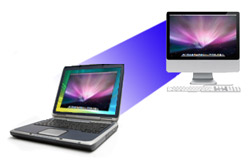
Remotely support even more customers with I'm OnCall's new version 1.1 adding Mac support. Along with the currently supported Windows remote control, you will soon be able to take control of a customer's Mac computer from your Windows PC to diagnose and resolve problems quickly and easily from anywhere over the Internet. Don't waste time unnecessarily traveling to a customer's location; take control of their computers from wherever you are to fix their problems. Contact us for info about I'm OnCall's new Mac support. Visit www.imoncall.com to learn more about I'm OnCall. |
 |
I'm InTouch Version 7.1 The new I'm InTouch 7.1 version will fully support computers with Windows XP 64 and Windows Vista 64 for even greater flexibility. I'm InTouch Standard and Premium Edition users will be able to remotely control their 64-bit computers with all the features of the 32-bit version. Contact us to learn more about I'm InTouch and 64-bit computing or visit www.imintouch.com. |
|
|
|


Bookkeeper uses I'm InTouch to increase productivity
|
|||||||


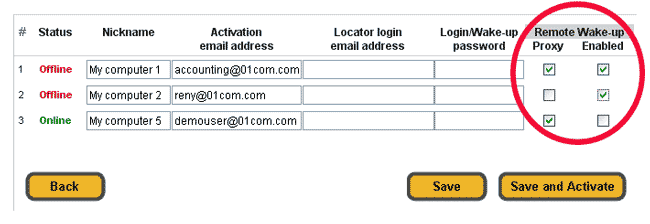
| Q. What are the settings "Wake-Up Proxy" and "Wake-Up Enabled" in the I'm InTouch Premium administrator page for? | ||
| These two settings are used to control the Remote Wake-Up feature of I'm InTouch Premium. By enabling the "Wake-Up Proxy" setting for a computer, that computer can then be used to power on other I'm InTouch Premium computers on the same network when a Remote Wake-Up request is made. The "Wake-Up Enabled" setting allows that computer to be remotely powered on using I'm InTouch Premium's Remote Wake-Up feature. See this page for information on using the Remote Wake-Up feature of I'm InTouch Premium.
To enable or disable these two features:
|
||
|
||
I'm InTouch in the News |
||
|
 |
|
"The I'm InTouch platform allows remote users to access data securely while providing a cost-effective and versatile platform for administrators and security professionals." Read the entire article |
"Awaiting lawsuit result, 01 Communique expands its solution platform. I'm InTouch Remote Access platform solution now includes software, hardware and services" Read the entire article |
|
|
||
 |
 3 Months for Free! Tell us how you use I'm InTouch at anytime and enter to win 3 free months of service! You must be an existing subscriber of I'm InTouch to enter. Please include your Serial Number, name and telephone number with your contest entry. Send all entries to marketing@01com.com |
|

To learn more about I'm InTouch, visit our web site at http://www.imintouch.com/
To learn more about I'm OnCall, visit our web site at http://www.imoncall.com/
01 Communique, 01 Communique Logo, and I'm InTouch are trademarks of 01 Communique.
All other products are trademarks or registered trademarks of their respective owners
If you do not wish to receive e-mail from us in the future, click on the Remove Me link below.
Remove Me Privacy Policy
To learn more about I'm OnCall, visit our web site at http://www.imoncall.com/
01 Communique, 01 Communique Logo, and I'm InTouch are trademarks of 01 Communique.
All other products are trademarks or registered trademarks of their respective owners
If you do not wish to receive e-mail from us in the future, click on the Remove Me link below.
Remove Me Privacy Policy