


| General Questions |
| |
|
|
I'm OnCall is a secure online help desk support application that auto configures a connection to your customer's PC or Mac, without any pre-installed software. Eliminate precious time spent on a support phone call or a premise visit, and dedicate more time to resolve your customer's technical issue quickly and efficiently with this computer remote support service.
|
|
|
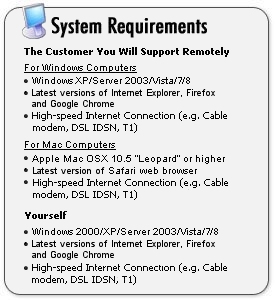
The I'm OnCall service technology, hosted in a secure data center, does all the work for you and therefore requires no investment in hardware or programming, leaving you to focus on delivering your expertise in computer remote support services. Here are the requirements: 
|
|
|
The I'm OnCall help desk management solution gives you the ability to deliver online computer remote support services to your customers. Just as you would log on to your favorite website, you can securely connect to I'm OnCall from anywhere and provide live computer support to new and existing customers. Built on a secure managed infrastructure, I'm OnCall allows you to seamlessly control your customer's PC or Mac from anywhere, and hence provide cost-effective problem resolutions.
- Login from your PC anywhere
- Request temporary on demand remote control of your customer's PC or Mac
- Customer authorizes your access and downloads temporary remote access files
- I'm OnCall auto configures your remote access across the Internet and displays your customer's computer within seconds
- Remotely diagnose and resolve their issue
- At the end of the session, temporary access files are removed from your customer's PC
See How it Works
|
|
|
- Password protected system access
- 256-bit SSL encryption used during system access and communications between the technician and customer computers
- Authorization required before technician's access is auto configured
- Customer ability to terminate session at any time
- Remote access connection automatically dismantled at the termination of a session to ensure technician cannot re-access
- No ports opened on the customer's network, firewall friendly - See Security
|
|
|
Simply follow these steps to subscribe online and create a billing account:
- Login to your I'm OnCall account (www.imoncall.com)
- Click on the "Subscribe Now!" link and you will be redrected to the Billing page.
- If you want to keep the same amount of licenses you used during the trial, simply enter your credit card information, press "I Accept" to proceed with the purchase. Otherwise, click on the Licenses tab to change the amount of licenses to purchase and then click on Continue.
- Follow the instructions shown on the screen to complete the transaction.
Users can also purchase I'm OnCall by contacting a sales representative by phone at 905-795-2888 or toll free at 1-800-668-2185 or by e-mail at sales@01com.com.
|
|
|
| Number of Licenses* |
Monthly Cost per License |
Annual Cost per License |
| 1 to 2 |
$99.95 U.S. |
$999.95 U.S. |
| 3 to 5 |
$89.50 U.S. |
$895.00 U.S. |
| 6+ |
sales@01com.com |
sales@01com.com |
| *Determined by the number of licenses that will be in use at the same time. For example, you have 5 help desk technicians. You know that no more than 3 will be using I'm OnCall at the same time. Instead of buying 5 licenses, you can just buy 3 licenses. |
License includes:
- Unlimited remote support sessions to your customers.
- No setup or installation fees.
- Technical support and upgrades included at no additional charge.
|
|
|
|
|
|
|
As I'm OnCall is a managed service platform, you can be up and running within a few minutes of your first login. Just as you would log on to your favorite Web Site, you can securely connect to I'm OnCall from anywhere and provide instant computer remote support services to new and existing customers. If you haven't already tried I'm OnCall, start a free trial.
|
|
|
Yes, you can display your company logo on every page of I'm OnCall to both your customers and technicians during a PC remote support session. Just upload your company logo to our servers and we will display it on all web pages. You can even add photos of your technicians if you want to personalize the support experience for your customers.
|
|
|
No. 01 Communique is committed to keeping your customer records private and secure as part of our privacy policy. Of course, you are responsible for maintaining the confidentiality and security of your user registration and password.
|
|
|
To export or backup data, log into your I'm OnCall system, and click the History tab. At the top right of your screen, there is an "Export" link. This link will export all data displayed on the page to a comma-delimited file format, also commonly known as CSV format, which can be viewed using an Excel spreadsheet or other application for data sorting.
Important: Please note that any information entered into your I'm OnCall system will be stored for only ninety (90) days from the date of entry. We recommend you back up any data you require by exporting it to your local computer.
|
|
|
Login to your I'm OnCall as Administrator and go to the Users tab. Then click on the user with the "Logged in" status and click on the "Suspend" button. The license will then be released, and the user suspended. You can reactivate the suspended user by clicking on the "Activate" button, without losing the license that you just released.
Note: The Administrator must logout and login back again in order to use the license just released.
|
|
|
In Internet Explorer, ensure the Override automatic cookie handling setting is enabled. This setting can be found in: Internet Option->Privacy-> Advance.
|